
Make an animated video from a script, with no pictures or clips
Pick one of 66 styles, paste a script, and your ChatGPT writes the code that draws each scene to what is said. DubLocal Studio renders it on your PC and adds the voice, background music, subtitles and logo like any other video.
Card payment for international customers is coming soon.
How to make an animated video in 4 steps
- 01
Sign in to ChatGPT
Go to Settings → AI and click Sign in to ChatGPT. Your PC needs Microsoft Edge or Google Chrome to render the pictures.
- 02
Paste the script
Open Script to video and paste a script or an .srt file; make several at once with Batch.
- 03
Pick a style
Under Picture style choose a group: Cartoon, Hand-drawn, East Asian, Print, Graphic, Keynote, Documentary, Evidence, Games, Cinema, 3D materials. Hover over a card to see its sample.
- 04
Create the video
Choose the voice, music and subtitles, then create. You get an MP4 and an SRT subtitle file in your folder.
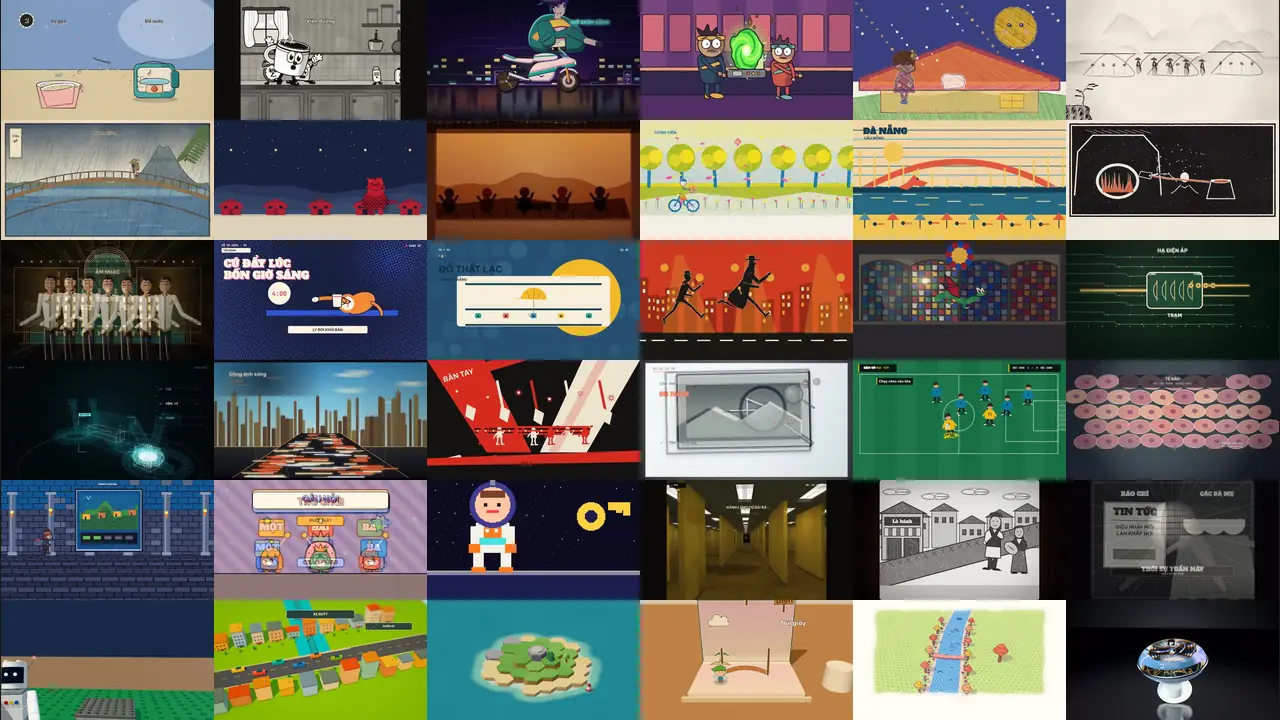
66 styles, watch a sample of each
Each clip was drawn by ChatGPT from a script written for that style. It runs about 15 seconds, with no sound. The videos you make have a voice, background music and subtitles.
- Cartoon
80s Cel Anime
Cel anime linework, a neon city and the violet dusk of an 80s film.
- Cartoon
1950s–60s Cartoon
Flat shapes, pastel colours and sparse backgrounds of mid-century animation.
- Cartoon
1930s Rubber Hose Cartoon
Black and white, limbs like rubber hoses, objects dancing to the beat.
- Cartoon
Sci-Fi Sitcom Toon
Bold outlines, a glowing green portal and comic science gadgets.
- Hand-drawn
Chalkboard
Chalk lines appear on a blackboard, words and diagrams following the lesson.
- Hand-drawn
Crayon Picture Book
Scribbled crayon strokes and round characters, like a children's picture book.
- Hand-drawn
Impasto Oil Painting
Thick slabs of colour like built-up paint, swirling with the motion.
- Hand-drawn
Chinese Ink Wash
Misty mountains, ink bleeding into paper and plenty of empty space.
- Hand-drawn
One-line Drawing
A single unbroken line turning into shape after shape.
- Hand-drawn
Urban Sketch
Pen sketches on paper, with the city gaining colour as the story goes.
- Hand-drawn
Watercolor Brush
Soft washes on paper, the scene moving from dry land to forest and sea.
- Hand-drawn
Whiteboard Explainer
Markers draw a diagram on a whiteboard, each idea adding a stroke.
- East Asian
Paper-cut Lightbox
Layers of cut paper with warm light shining through each opening.
- East Asian
Red Paper-cut
Red paper cut into patterns, with figures and villages in a folk style.
- East Asian
Shadow Puppetry
Puppets on a glowing orange screen, jointed and cut with fine patterns.
- East Asian
Ukiyo-e
Mountains, waves and rain in the flat colours and bold lines of Japanese prints.
- Print
Copperplate Engraving
Dense engraved lines build the picture on paper, like an old book plate.
- Print
Halftone Dossier
Halftone dots, big type and stamps, telling the story as a case file.
- Print
Printed Long Take
Paper and black ink, the camera pulling back through the hills in one take.
- Print
Risograph Print
Misaligned inks and coarse grain, with bright colours overlapping.
- Print
Silkscreen Travel Poster
Flat colour and big type, every scene like a travel poster.
- Print
Woodcut Print
White cuts on black ink, rough and strong like a woodblock.
- Graphic
Art Deco
Gold on dark, with the geometric lines and sunbursts of the 1920s.
- Graphic
ASCII / CRT Terminal
Pictures built from glowing characters on an old CRT screen.
- Graphic
Blueprint
Thin lines, gears and a title block, in the manner of a technical drawing.
- Graphic
Pictogram Motion
Flat pictograms morphing from one scene into the next.
- Graphic
60s Spy Title Sequence
Silhouettes running across bold colour, like a spy film's opening titles.
- Graphic
Stained Glass
Panes of coloured glass lighting up, the story told window by window.
- Graphic
Swiss Motion Graphics
A clear grid, big numbers, sans-serif type and one red accent.
- Keynote
Circuit Board
Glowing traces run past components, the current leading the story.
- Keynote
Dark Tech Keynote
A dark stage and softly lit interface cards, made for a product launch.
- Keynote
Data Storytelling
Charts draw themselves with the narration, a pencil marking what matters.
- Keynote
Sci-fi Hologram HUD
Glowing wireframes and floating readouts, like a sci-fi film display.
- Keynote
Isometric Infographic
Tilted 3D scenes on a light ground, with each step on its own small plot.
- Keynote
Isometric Picture Book
Tiny people in a tilted space, told like a picture book.
- Keynote
Living Screencast
A software screen runs by itself, with a moving cursor and a small guide.
- Keynote
Transit Map
Lines grow into a colourful map, with stations lighting up as you speak.
- Documentary
Caption News
Big captions over a cheerful street, easy to follow with the sound off.
- Documentary
Time-lapse Symphony
A city in fast motion from dawn to night, traffic turning to streams of light.
- Documentary
Live Countdown Split-screen
A running clock, with more screens opening up towards the deciding moment.
- Documentary
Constructivist Montage
Red, black and cream, with hard diagonals and slanted type from old posters.
- Documentary
Broadcast News Package
Lower thirds, charts and headline panels at a TV news pace.
- Documentary
1920s Newsreel
Scratched black and white, title cards and crowds, like an old newsreel.
- Documentary
Sports Telestrator
Arrows and circles drawn right on the pitch to break down each move.
- Documentary
Visual Investigation
Clocks, maps and photos compared moment by moment on a dark desk.
- Evidence
Archive Light Table
Photos, a magnifier and a ledger on a light table, each detail checked.
- Evidence
Engineering Briefing Board
Drawings on paper comparing each option, with labels and measurements.
- Evidence
Data Physicalization
Numbers become stacks of blocks on a table, so the difference is plain to see.
- Evidence
LiDAR Survey
A cloud of laser points sweeps the forest to reveal the ground below.
- Evidence
Microscope Story
Zooming through the lens until cells appear beside a scale bar.
- Evidence
Satellite Briefing
Seen from orbit, comparing the same land across the years.
- Evidence
Exploded Teardown
An object separates into layers in 3D, with every part named.
- Evidence
Projection on White Model
A white model lit up with colour, one layer of the story at a time.
- Games
Game Show Flat
Bright colours, a scoreboard and funny characters, like a TV game show.
- Games
HD-2D
Pixel characters in a 3D scene with real light and depth.
- Games
Microgame Frenzy
Pixel art and seconds-long challenges, one after another, faster each time.
- Games
16-bit Pixel RPG
Castles, party members and a save screen from a 16-bit role-playing game.
- Cinema
Liminal Found Footage
Endless yellow corridors, a shaky camera and something just behind you.
- Cinema
1920s Silent Film
Black and white, worn frame edges and the big gestures of silent cinema.
- 3D materials
3D Toy Bricks
Everything is built from 3D toy bricks, assembled as the story goes.
- 3D materials
Desktop Flythrough
The camera flies past photos, apps and screens laid out on a desk.
- 3D materials
Glass Product Render
A clear glass object turns on black, light sliding along its curves.
- 3D materials
Low-poly Isometric Island
A 3D island built tile by tile, trees and houses rising as day turns to night.
- 3D materials
Memphis Diorama
A candy-coloured model, dotted patterns and four seasons on one scene.
- 3D materials
Paper Pop-up Book
Paper pages open and the scene stands up, page after page.
- 3D materials
Tilt-Shift Miniature
A city like a tabletop toy, blurred at both ends with tiny traffic.
66 styles in 11 families
Each style has its own way of drawing, its own colours and motion. The styles come from the open-source Lemo-Opuscar library by LemoLab (github.com/lemomo-ai/lemo-opuscar).
- Cartoons: 1930s, 1950s-60s, 1980s anime, science fiction.
- Hand-drawn and East Asian: watercolour, ink wash, oil, crayon, Japanese woodblock prints, shadow puppets, paper-cut.
- Print and graphic: risograph, copperplate engraving, silkscreen posters, Art Deco, stained glass, blueprints.
- Games and 3D: 16-bit RPG, HD-2D, toy bricks, a low-poly island, a pop-up paper book.
Short films are written alone, long ones reuse a kit
A script of up to 16 sentences gets a film ChatGPT writes for it alone, so the pictures follow the words most closely; it usually takes a few minutes. A longer script uses a kit for that style: written once and kept on your PC, after which every 10 sentences cost one small ChatGPT turn to choose scenes. The next video in the same style is therefore quicker and uses fewer turns, but its scenes repeat more than a film written alone.
Limits to know
The pictures are drawn by code an AI writes, so quality varies by style and by run, and you may need to create one again. The feature uses your ChatGPT account's turns, shared with translation and other AI work. A free account can run out quickly and may have to wait for weeks; what was written is kept so the next run continues. 3D styles render more slowly on a weak PC.
Watch DubLocal Studio from start to finish (Vietnamese audio)
The tutorial covers installing, opening a video, transcribing, translating, casting, generating voices and exporting MP4.
Frequently asked questions
Do I need pictures or clips?
No. Every picture is drawn in code, with no picture search and no search quota used.
Can I use Gemini?
For now it uses ChatGPT only, signed in with your own account in Settings → AI.
Can it make a 30-minute film?
Yes, with the style's kit: written once, then one small turn per 10 sentences. It takes a little over an hour on a strong PC, and a free account can run out midway.
Do I have to credit anyone in my videos?
The videos you make are yours, with no credit needed. The samples in Studio were also drawn by ChatGPT, one for each style.