
Blur phone numbers, addresses and names in a screen recording
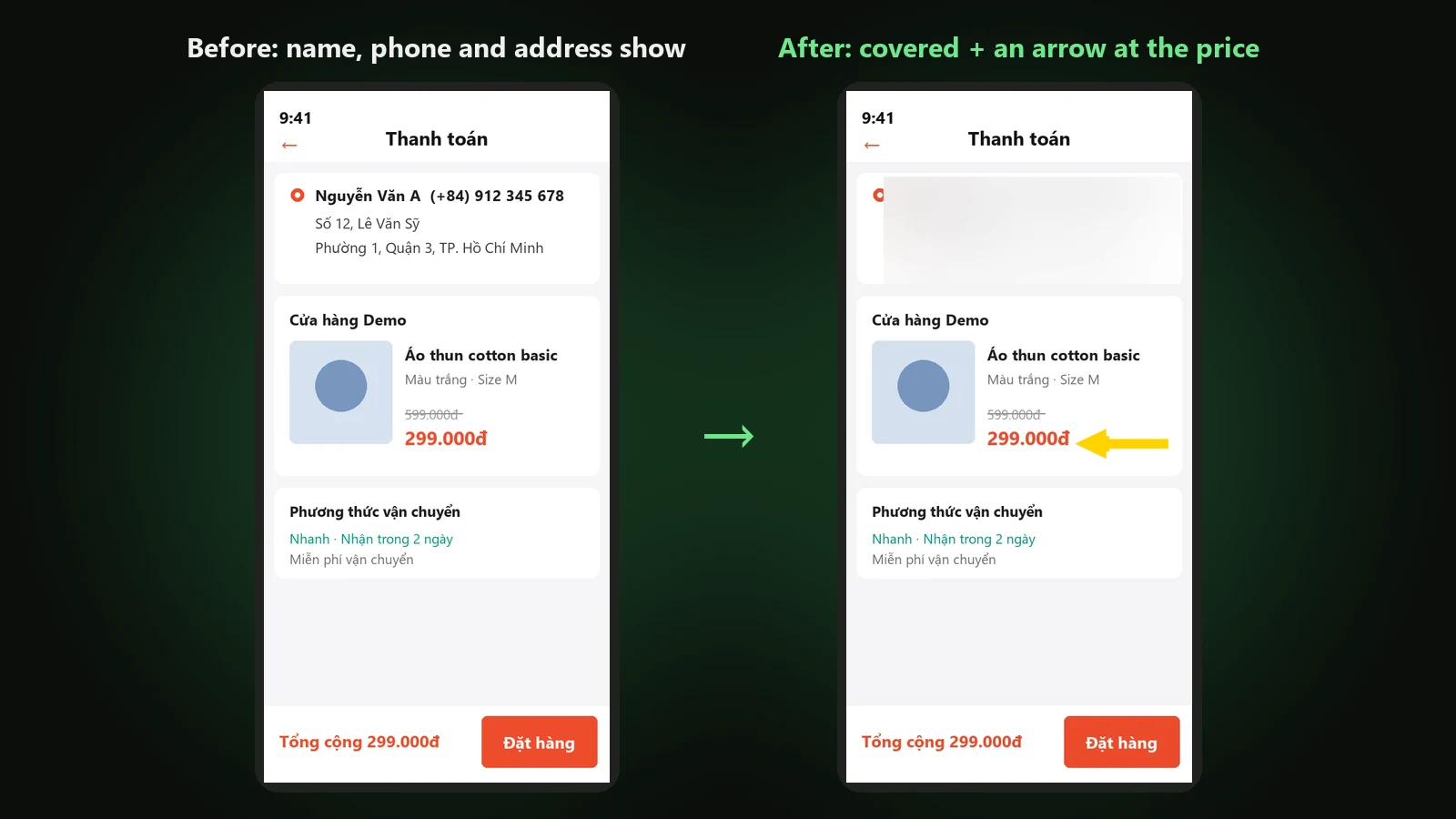
Screen recordings of an order, a chat or a delivery slip often show your name, phone number and address. DubLocal Studio reads the text on every frame, covers those lines with one blurred block that follows the page as it scrolls, and lets you draw more boxes right on the player before exporting the MP4.
Card payment for international customers is coming soon.
Updated October 2026 · The DubLocal team
How to blur personal info in a video
- 01
Open the video
Open the video to cover; on the Script or Export step, press Cover info right under the player.
- 02
Turn on detection
Turn on Detect sensitive info automatically (OCR): Studio looks for phone numbers, emails, addresses and lines labelled Address, Phone, Hotline or Zalo.
- 03
Add your own text
Type your phone number, street or name into Text and numbers to cover, one per line: every line that shows them is covered.
- 04
Check and export
Drag, resize or delete each box, set when it starts and ends, then export the MP4. Boxes apply to the original picture, so they stay in place with copyright protection on.
Finds phone numbers and addresses and covers them as one block
Studio reads the text on the frame twice a second. A line with a phone number, an email, a house number before a street, a ward or district, or a label such as Address, Phone, Hotline or Zalo is covered whole, with the name printed on the same row. The lines of one address card (name and phone, street, ward, city) join into one large block instead of several thin strips.
An address once found is remembered for the whole video: when the page scrolls and the address shrinks into the header, Studio still recognises it and covers the full line.
Nothing shows while the page scrolls
On a scrolling screen recording the box follows the text from frame to frame, starting a few frames early and ending a few late, so the address never flashes between two reads. A frame blurred by scrolling that the recogniser misses does not break the box either.
Draw boxes by hand
Turn detection off to cover by hand only. Drag on the video to draw a blur box, drag a box to move it, drag the dots on its sides and corners to resize, use the arrow keys to nudge and Delete to remove. Each box has a start and an end, set with the buttons that take the moment you are watching.
Animated arrows and frames that point at the product
Next to Cover info are Arrows and Frame: an arrow that bounces the way it points (any angle), a rounded rectangle, your colour and timing. Each time an arrow appears, Studio adds a “ding” at that moment in the exported video.
Reads text with Windows' own recogniser
No model to download: Studio uses the text recogniser built into Windows 10 and 11. If Windows only has English, phone numbers still read correctly; press Install Vietnamese text recognition to add Windows' Vietnamese pack (under 10 MB, about 1–3 minutes, Windows asks for admin permission) for accented addresses.
- Screen recordings of shopping, deliveries, e-wallets
- Tutorials with messages, emails or account numbers on screen
- Product reviews with a shipping slip or an address label
Watch DubLocal Studio from start to finish (Vietnamese audio)
The tutorial covers installing, opening a video, transcribing, translating, casting, generating voices and exporting MP4.
Frequently asked questions
Does detection cover everything?
Every box it finds is a draft: check it on the player before exporting. Add your own text and numbers to Text and numbers to cover to be sure, or draw more boxes by hand.
How long does a scan take?
Usually a few seconds for a short clip of a few dozen seconds: still frames are skipped and only frames that changed are read again.
Does it need the internet or an AI model download?
No. The text recogniser is part of Windows; only the optional Vietnamese recognition pack is downloaded, by Windows.
Do the boxes move with copyright protection on?
No. Boxes apply to the original picture before the mirror and zoom, so they always sit where you drew them.
Is the thumbnail covered too?
Not yet. Boxes apply to the exported video; for a thumbnail made from a frame, pick a frame without personal info.
How many boxes can a video have?
Up to 300 per video, enough for a long scrolling screen recording.